Table of Contents
Introduction- 13 Key Steps to Plan a Mobile App From Scratch
- 1. Define Your App Idea
- 2. Identify Your Target Audience
- 3. Analyze the Market
- 4. Define Core Features
- 5. Choose Your Platform
- 6. Design the UI/UX
- 7. Choose the Technology
- 8. Plan the Development Process
- 9. Set Budget and Timeline
- 10. Plan for App Security
- 11. Test the Mobile App
- 12. Launch and Market the App
- 13. Maintain and Improve the App
- Conclusion

Mobile apps have become an essential part of everyday life. People use them for communication, shopping, education, banking, transportation, entertainment, and many other activities. For businesses, a well-planned mobile app can improve customer experiences, simplify operations, and create new growth opportunities.
However, building a successful mobile app involves much more than writing code. Without proper planning, businesses can face unexpected costs, development delays, technical problems, and poor user experiences.
Planning a mobile app from scratch helps you define clear goals, understand your users, prioritize features, select the right technology, and create a smoother development process.
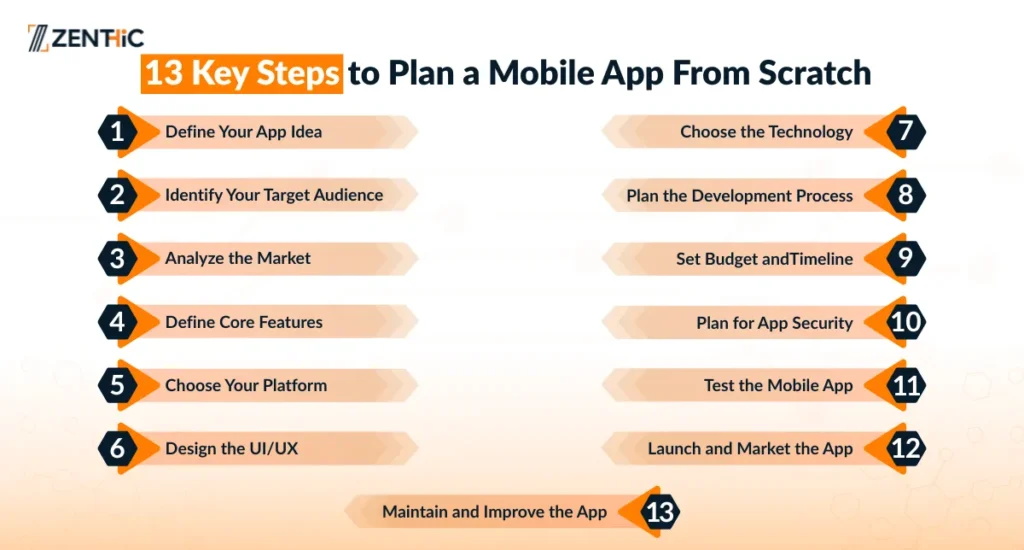
13 Key Steps to Plan a Mobile App From Scratch
In this guide, we will explain the key steps and strategies for app development, from defining your idea to launching and maintaining your app.
1. Define Your App Idea
The first step in the mobile app development process is to define exactly what your app will do and what problem it will solve. A strong app idea should provide a useful solution, save users time, or make a specific task easier.
Before moving into development, ask yourself:
- Who experiences this problem, and how often?
- What solutions are people currently using?
- What specific problem will the app solve?
- Why would users choose this app over existing alternatives?
- What value will the app provide to users?
A clear idea gives your development team a strong direction and helps prevent unnecessary features from being added later.
2. Identify Your Target Audience
Once you have an app idea, identify the people who are most likely to use it. Your target audience will influence everything from the app’s features and design to its platform and marketing strategy.
Consider factors such as:
- Demographics: Age, occupation, location, and income level
- Device preferences: Android, iOS, or both
- User behavior: How users currently solve the problem
- Needs and pain points: What users expect from the app
- Technology habits: How frequently they use mobile applications
Understanding your audience helps you build an app around real user needs instead of assumptions.
3. Analyze the Market
Before investing in development, research the existing market. Identify apps that offer similar products or services and analyze their features, pricing, design, ratings, and user reviews.
Competitive research can help you discover:
- Features users appreciate
- Problems users frequently report
- Gaps in the market
- Pricing and monetization models
- Opportunities to differentiate your app
Pay particular attention to negative reviews on the App Store and Google Play. These reviews can reveal frustrations and unmet needs that your app could address.
4. Define Core Features
One of the most important app development steps is deciding which features your app actually needs. Instead of trying to build everything at once, start with a minimum viable product (MVP). An MVP includes the essential features required to solve the main user problem and provide value.
To define your MVP:
- List all potential features.
- Separate must-have features from nice features.
- Rank features based on user value and business goals.
- Focus the first release on the core problem.
Starting with an MVP can reduce development time and costs while allowing you to collect real user feedback before expanding the product.
5. Choose Your Platform
Next, decide which platforms your app will support and how users will move through the application.
Your main options include:
- Android: Offers access to a large and diverse user base across many devices.
- iOS: Particularly important for markets such as North America and Western Europe, where users often have strong purchasing power.
- Cross-platform: Frameworks such as React Native and Flutter allow businesses to develop apps for multiple platforms using a shared codebase.
You should also map the user flow. Think about what happens when a user opens the app, completes an action, and reaches their desired outcome. A clear structure makes navigation easier and creates a better mobile app user experience.
6. Design the UI/UX
Good mobile app design should make the application easy to understand and use. Users should be able to complete important tasks without unnecessary steps or confusion.
Focus on:
- Simple navigation
- Clear layouts
- Consistent design elements
- Readable typography
- Accessible interactions
- Fast and responsive screens
Avoid overcrowding the interface with unnecessary options or information. A clean and intuitive design can improve usability, engagement, and overall user satisfaction.
Prototyping tools such as Figma can also help you create interactive designs and test the user flow before development begins.
7. Choose the Technology
After defining your platform and design, select the technologies needed to build the application.
Your technology stack may include:
- Frontend: Native development or cross-platform frameworks
- Backend: Django, Node.js, Ruby on Rails, or other technologies
- Database: SQL or NoSQL
- APIs: For connecting the app with external systems and services
- Third-party integrations: Payment gateways, analytics, maps, notifications, and other services
The right technology should depend on your app’s features, performance requirements, scalability needs, budget, development expertise, and target audience. Choosing the right stack early can make future updates and scaling much easier.
8. Plan the Development Process
A clear development plan keeps the project organized and helps prevent delays.
If you’re working with a development team; assign responsibilities clearly and divide the project into smaller tasks. Instead of developing everything simultaneously, break the work into manageable stages.
Typical development tasks include the following:
- Creating the database
- Developing user registration and login
- Building app screens
- Implementing core features
- Connecting APIs
- Setting up notifications
- Integrating payment systems
- Testing individual components
9. Set Budget and Timeline
Mobile app development costs vary depending on the app’s complexity, number of platforms, features, design requirements, technology stack, and development team.
Your budget should account for:
- UI/UX design
- Development
- Testing
- Third-party integrations
- Marketing and launch
- Hosting and infrastructure
- Maintenance and updates
Similarly, create a realistic timeline for each stage of the project. Include some buffers for unexpected technical issues, revisions, testing, and delays.
10. Plan for App Security
Security should be considered from the beginning rather than added after development. If your application handles user accounts, payments, personal information, or sensitive business data; security becomes important.
Consider:
- Secure user authentication
- Data encryption
- Secure API communication
- Protected payment processing
- Secure data storage
- Regular security updates
- Appropriate privacy controls
Building security into the development process helps protect users and reduces the risk of costly security problems after launch.
11. Test the Mobile App
Testing is one of the most important stages of mobile app development. Even a well-designed application can contain bugs, performance problems, or usability issues.
Important testing types include:
- Functional testing: Does everything work as intended?
- Usability testing: Is the application easy to use?
- Performance testing: Does the app remain responsive under different conditions?
- Compatibility testing: Does it work properly across different devices and operating systems?
- Security testing: Is user and business data protected?
- Beta testing: What do real users think about the application?
Test important functions such as registration, login, navigation, notifications, payments, forms, and data storage before launch.
12. Launch and Market the App
Once your app has passed testing, prepare it for launch. This includes publishing it to the appropriate app stores, preparing screenshots and descriptions, and developing a marketing strategy.
Your launch strategy may include:
- App Store Optimization (ASO)
- Social media marketing
- Content marketing
- Paid advertising
- Email marketing
- Influencer or partnership campaigns
After launch, monitor downloads, engagement, reviews, crashes, and other performance metrics. User feedback can help you identify what needs to be improved.
13. Maintain and Improve the App
Launching the app is not the end of the development process. Mobile applications require continuous maintenance to remain secure, compatible, and useful.
Regular maintenance may include:
- Fixing bugs
- Improving performance
- Updating security
- Supporting new operating system versions
- Improving existing features
- Adding new functionality
- Analyzing user feedback
Use real user data and feedback to decide which improvements should be prioritized. Continuous optimization helps keep the app relevant and competitive over time.
Conclusion
Creating a mobile app from scratch is the foundation of a successful digital product. From developing your app idea and analyzing your target audience to selecting the correct technology, testing, launching, and continuing maintenance, each step is critical to providing a dependable and user-friendly app.
Working with an experienced mobile app development company will help you transform your idea into a scalable, secure, and high-performing application while avoiding common development issues. You may create a mobile application that satisfies user needs and promotes long-term business growth with the appropriate plan and development partner.